Most businesses do not have a brand problem. They have a consistency problem. The logo on the invoice is a different file from the logo on the site. The blue on the quote is not the blue on the Facebook page. Nobody chose any of that. It happened one file at a time, over years, and now nobody knows which version is the right one.
In Velora your brand is one record, and everything else reads from it.
One screen, with your site next to it
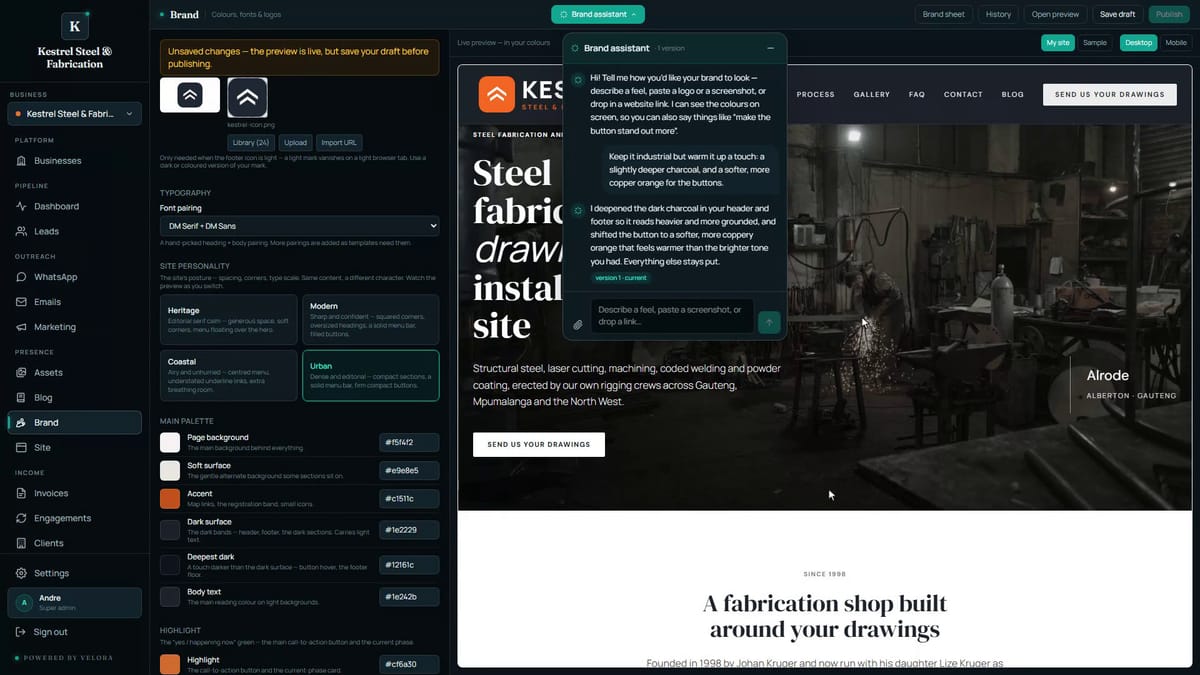
Brand holds your name, your logos, your fonts, your site's personality and your colours. On the right sits a live preview of your own site, so you are never choosing a colour against a white square and hoping.
Every page, every email and every advert preview draws from this screen. Set it once and it is kept, which means the invoice and the campaign and the website stop disagreeing with each other.
Personality, before colour
Personality is the site's posture: the spacing, the corners, the size of the type. Same words, different character. It is the setting that does the most and gets talked about least, because it is the one nobody has a vocabulary for. Switch it and watch the preview, and the difference between a business that reads as careful and one that reads as friendly is right there on your own page.
Fonts come as hand picked pairings, a heading face and a body face chosen to work together. There is no wrong combination to fall into, because the wrong combinations are not offered.
Or describe what you want
Open the Brand assistant and describe a feel. Paste a screenshot of a brand you like. Drop a link. It proposes colours and fonts to match.
It works inside the rules rather than around them. Every colour it proposes is checked for contrast, so the site stays readable for people who need it to be. It can only choose fonts from the pairings that exist. And nothing it proposes reaches your live site until you publish.
When it lands, the whole preview moves at once: the buttons, the dark bands, the accents. You are looking at your site, not a swatch.
And by hand, when you have a guide to match
If you have a brand guide, every colour is yours to type in.
Pick one that would be hard to read and Velora says so, and will not let you save it. Darken it a touch and the warning goes. That guard is not there to be clever. It is there because unreadable pale grey text on white is the single most common thing that goes wrong when someone sets their own colours, and it is invisible to the person who chose it and obvious to everyone else.
The Brand sheet exports the lot as a PDF: colours, fonts and logos on one page, for a printer, a signwriter, or anyone who asks what your brand is. That is usually the first time a business has ever had one.
Save the draft and publish when you are happy. Every page and every email picks it up from there.
The video at the top of this post is the whole screen, start to finish, with nothing cut out.