There is a particular spreadsheet that most businesses are running on. It has the invoice numbers in one column, an amount in the next, and a colour on the row when somebody has paid. It works until the day it does not, which is usually the day you need to know what is actually owed to you and the honest answer is that nobody is sure.
Invoicing is not the exciting part of a business. It is the part that decides whether the exciting parts get paid for.
Three numbers, first
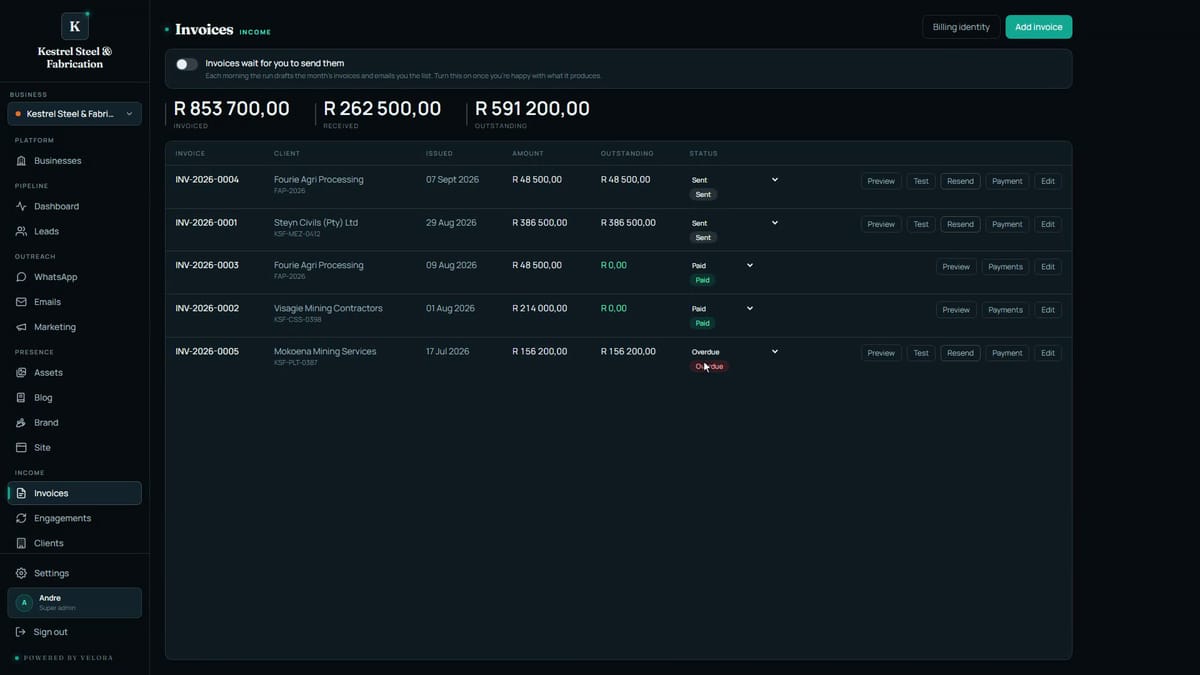
The invoice screen opens with the three numbers that matter: what you have invoiced, what has come in, and what is still owed.
Below them, every invoice with its client, its date and its status. Sent, paid, overdue, at a glance. Not a filter you have to build. The state of your billing, the moment you open the screen.
Raising one takes a minute
The client, the dates, the amount, a line saying what it is for, and a reference. Save it as a draft, or as sent if the PDF should go out now.
It takes the next number in your sequence automatically, which sounds trivial until you have had two invoices with the same number in the same year and a client asking which one they paid.
Preview what the client actually gets
Preview shows the PDF exactly as it lands with them. Your logo and your colours. Your banking details. The terms from your billing identity, filled in for you.
That last part is worth pausing on. The details that say who you are on an invoice, your legal name, your registration, your banking, are not typed into each invoice. They are read from the business record at the moment the PDF is made. So there is no such thing as an invoice going out with last year's banking details on it because it was built from an old copy.
Record the money, and the rest works itself out
When money arrives, record it against the invoice: the amount, the date, how it came in.
The status sorts itself out from there. Part paid, paid, or still overdue. The three numbers at the top move with it. You are not maintaining a view of your billing, you are recording facts and reading the view.
And the monthly ones run themselves
Clients on a retainer are handled by a morning run. It drafts the invoices and emails you the list.
It is deliberately a draft and a list rather than a send. You switch it over to sending on its own once you trust what it produces, and not before. That order matters: an automatic invoice run that goes straight to clients on day one is a good way to send somebody the wrong amount with your name on it.
The video at the top of this post is the whole screen, start to finish, with nothing cut out.